How optimization strategies work
Last updated: October 12, 2026
An optimization strategy is a saved ruleset, not a one-time run. This article is about what's inside that ruleset — the pieces you configure once, and how they come together every time the strategy fires — and about the timing model that decides when it fires. For what an optimization strategy is and where you find it, start with optimization strategies. For how Nash turns a set of orders into sequenced routes — the solve itself, and the fleet and network settings that shape it — see how optimization works. This article stops short of the solve; it's about the object that kicks the solve off and tells it what to work with.
Note
Optimization strategies are available depending on your organization's setup. If you don't see them under Orchestrate ▸ Optimization Strategies, reach out to Nash. (Dispatch strategies, by contrast, are on for everyone — the two objects are not the same surface.)
How it works
Everything a strategy does splits cleanly into two jobs. First, it bundles the scope and shape of a run — which fleets the solver may draw from, which store locations and orders a run pulls in, which areas it must avoid, and the service and route settings that tune the result. Second, it owns the timing that decides when a run happens at all. That timing is genuinely unique to this object: nothing else in Nash decides, on its own, that optimization should happen now.
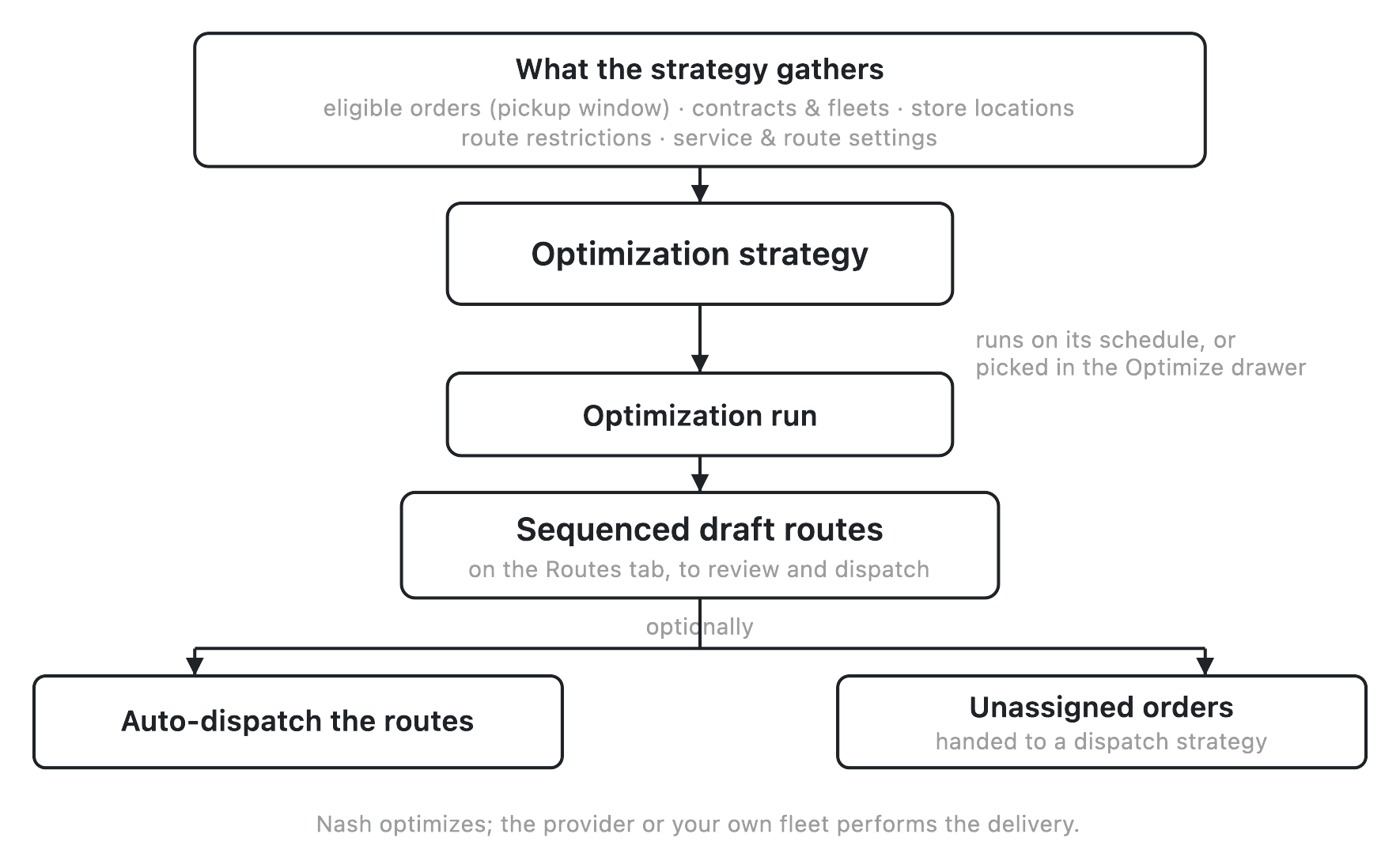
A strategy never performs the solve itself, and it never delivers. When it fires, it gathers its inputs and produces an optimization run that returns sequenced draft routes — which orders ride together, in what order — onto the Routes tab for you to review. Nash optimizes and dispatches; the provider or your own fleet performs the delivery.
The self-running path is the primary one, and it has one detail worth understanding up front: fan-out. When a strategy has store locations attached, a scheduled run does not sweep the whole organization once. Instead it fans out into a separate run per store location — and, where relevant, per upcoming day and per pickup shift — each on its own cadence clock. A strategy with no store locations attached runs once, organization-wide. This single choice is the biggest lever over what a run looks like — it's called out again in the failure modes below.
Each fanned-out run gathers the orders whose pickup time falls inside the strategy's pickup-time window, the fleets its contracts allow, the route restrictions it attaches, and its service and route settings — then produces the draft routes. If Auto-Dispatch after Optimization is on, those routes go straight to dispatch instead of waiting for review. Any order the run couldn't fit onto a route is handed off separately (covered under Dispatch Options).
What you configure
The editor renders these sections top to bottom. Most of them shape a run; one of them — Optimization Timing — is the timing model itself.
Strategy Info. A Strategy Name (required — this is the display name you'll pick from later) and, once a strategy exists, a read-only, copyable Strategy ID. The ID is just a stable handle for support and reference; you never edit it.
Optimization Engine. Which routing engine solves this strategy's runs. Each engine available to your organization shows as a card; pick one and save, and it becomes the engine this strategy's runs are solved with — the card you picked is marked Selected for this strategy. A strategy has exactly one engine, and a strategy you've never changed stays on the default engine. Configure engine on any card opens a read-only panel that shows how this strategy's settings carry over to that engine: its routing parameters and stop service times, each next to the engine setting it lands on, with anything the engine has no equivalent for called out as dropped when that engine runs. Check it before you switch, so you know the levers you rely on — Search Level, Clustering Level, Balance Routes, the traffic source — still apply. A run that needs something the chosen engine can't handle — attached route restrictions, for example — is solved on the default engine instead.
Note
The Optimization Engine section only appears when your organization has more than one engine available. Availability varies by organization — reach out to Nash for access. If an engine a strategy already uses stops being available, its card stays on that strategy, marked Not enabled for this organization, and can't be picked again once you switch away.
Optimization Timing. This is the heart of the object, and it has two layers.
The first layer is one or more schedules. Each schedule sets which days it runs — summarized as Everyday, Weekdays, Weekends, or a custom day list — and a Cadence, which is either a set clock time ("At") or a recurring interval ("Every", built from hours and minutes). Each schedule carries its own timezone, and an optional Active Dates range with a start and end date; leave the end date blank and the schedule runs indefinitely. A read-only Next Optimization At shows when the schedule will next fire. A strategy can hold several schedules if different cadences make sense at different times. Default: none until you add one.
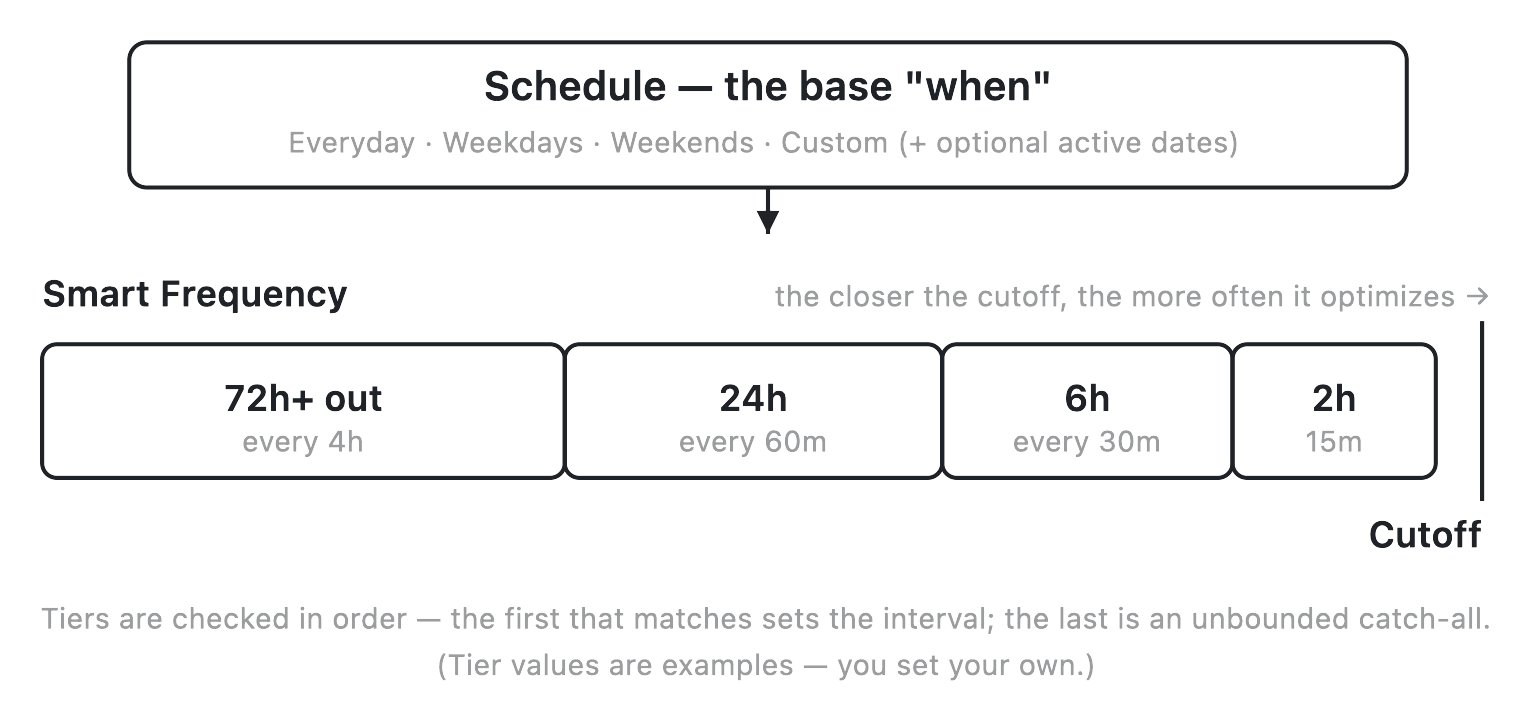
The second layer is Smart Frequency, and it's standard on every strategy — there's nothing to turn on for it to be available. Smart Frequency is a list of tiers, each pairing a Max Hours Before Cutoff with an Interval (minutes). As a delivery's cutoff approaches, a tighter tier takes over from a looser one so the strategy optimizes more often when it matters most. Tiers are evaluated in order and the first matching tier wins; the last tier must be an unbounded catch-all with no max hours, so there's always an interval in effect. You can optionally tell Smart Frequency to hold off until a set number of minutes before the window opens, so a strategy with a tight final tier doesn't also fire needlessly far in advance. Default: off (until you add tiers).
Tip
The editor enforces the tier rules for you: the last tier must have no max hours, every earlier tier must have one, and the max-hours values must ascend. If Save is disabled, a Smart Frequency tier is usually why — check that the bottom tier is your "no limit" catch-all.
Contract Selection. Which fleets and vehicle pools the solver may draw from — you must add at least one. Each contract has two editable overrides: Use All Vehicles (when on, a run exhausts this provider's drivers before moving to the next provider in line) and a Vehicle Count. A contract's lead time and its own Dispatch Strategy show here read-only, the latter as a linked badge — a seam to dispatch strategies: the contract rules the dispatch decision, while the strategy rules the optimization decision. Depending on your role, you may not see cost fields on a contract; that's a display setting, not a broken form.
Shift Contract. The contract used for shift-based vehicles. This section may not appear for every organization; if it doesn't, it isn't turned on for your setup.
Store Location Selection. Restrict the strategy to chosen store locations. As covered above, this also decides fan-out: with store locations attached, a run fans out per store location; with none, it runs organization-wide. Default: none.
Important
The store-location choice is only locked after creation for location-scoped users — operators whose access is limited to specific locations must pick their store set when they create a strategy and can't change it afterward. Organization-wide users can still edit store locations after creation. If older guidance told you this is always locked once created, that's out of date.
Route Restrictions. Attach geographic areas the optimizer must avoid traversing. The library of restrictions is managed on its own surface — see route restrictions — and attaching one here just points this strategy at it.
Order Pickup Time Range. A From/To window, measured in minutes from each order's pickup time, that decides which orders a run pulls in. Only orders whose pickup time falls inside the window are eligible for that run, and the From value must be less than the To value. Narrow it and a run considers fewer, more time-relevant orders; widen it and more of the pool becomes eligible.
Dispatch Options. Auto-Dispatch after Optimization (default off) sends a run's routes straight to dispatch as soon as they're optimized, instead of holding them for review. The Unassigned Orders Fallback Strategy names a dispatch strategy for orders the optimizer couldn't route: rather than dropping them, they're handed to that strategy to dispatch individually. Whether that hand-off actually fires is available depending on your setup — the field is configurable everywhere, but its enforcement may be off for your organization, so reach out to Nash if you're relying on it and don't see it work.
Service & Route Settings. The richest section, and mostly reference territory — this page names the controls; the field-by-field depth lives in the optimization parameters reference. Here you set per-stop service times (pickup, dropoff, and incremental cushions), the traffic source Nash plans against, a Traffic Time Offset in weeks, Balance Routes (None, Same Provider, or All Providers — how evenly work spreads across routes and providers; default None), Search Level (0–3, where higher means better routes but a slower solve), Clustering Level (0–2, how aggressively nearby stops group), and Save Optimized Routes (default off, persist a run's routes as drafts).
Note
One control you may spot in this section isn't documented as a working tool on purpose. Don't lean on the "Soft Capabilities" selector — it isn't a reliable savable control today. Stick to the settings described above.
Strategy states
A strategy is either active or inactive, and the switch is soft and reversible — you deactivate, you never delete. The configuration is kept intact either way.
| State | What it means | Typical next step |
|---|---|---|
| Active | The schedule and Smart Frequency run it on its own; a shift change on your own fleet can also nudge a reactive re-optimization | Runs produce draft routes; Deactivate to pause |
| Inactive | Deactivated — the config is kept, but the schedule never fires and the strategy won't run reactively | Reactivate to resume on the same schedule |
Active and inactive strategies live under separate tabs, so deactivating one moves it out of your working list without losing anything; reactivating picks the same schedule right back up.
What happens each time it runs
A run isn't something you watch inside the editor — there's no "Run now" button and no results panel. A run's output appears on the Routes tab. Here's what happens between the schedule firing and routes landing.
| Stage | What it means | Typical next step |
|---|---|---|
| Due | The schedule's next-run time has arrived and the active date range applies | Fan-out / gather |
| Gathering | The run pulls in orders inside the pickup-time window, the allowed fleets, the attached route restrictions, and the settings — fanning out per store location (and day and shift) when store locations are attached, else once organization-wide | Solve |
| Draft routes produced | Sequenced routes land on the Routes tab, waiting for review | Review & dispatch, or auto-dispatch if enabled |
| Auto-dispatched | Only if Auto-Dispatch after Optimization is on — the routes are sent to dispatch instead of waiting | Delivery execution |
| Unassigned handled | Orders the run couldn't fit onto any route are handed to the named fallback dispatch strategy, where enabled, to dispatch individually | Individual dispatch |
Smart Frequency changes how often those runs happen as the cutoff nears. The transition, in the abstract:
| Time to cutoff | Which tier applies | Effect |
|---|---|---|
| Far out, before the "start optimizing" point | none | No runs yet (suppressed) |
| Within the loosest bounded tier | that tier | Runs at that tier's interval |
| Closer, within a tighter bounded tier | first matching tier | Tighter interval takes over |
| Past every bounded tier | the unbounded catch-all (last tier) | Always-in-effect interval |
| After cutoff | the tightest (first) tier's interval | Keeps refining locked routes |
The two ways a strategy runs
There are exactly two, and the contrast with dispatch strategies is worth being precise about: no workflow applies an optimization strategy. A dispatch strategy can be assigned to matching orders by a workflow action; an optimization strategy never is. It only ever runs itself, or is borrowed by hand.
- On its own schedule. Once active, the timing model above runs it without anyone triggering it — the schedule and Smart Frequency are the whole mechanism. A shift change on your own fleet can additionally nudge an out-of-schedule re-optimization for that store location, but that's a reaction on top of the schedule you configure, not a separate thing to set up.
- As a preset in a manual optimization. When you optimize a set of orders by hand in the Optimize drawer, you can pick a saved strategy as your starting point instead of configuring a run from scratch — the "Use a saved strategy" tab. See optimize orders into routes for that workflow. Picking a strategy this way borrows its config bundle for that one run; it does not change the strategy's own schedule. If the strategy names an engine, the drawer shows it next to the strategy you picked — the engine is chosen on the strategy, not in the drawer.
Either path produces the same result: sequenced draft routes on the Routes tab, ready to review before anything ships.
Edge cases and failure modes
Most "why isn't my strategy doing anything" questions come down to one of a handful of shapes, and none of them lose work — they're all recoverable.
The strategy is deactivated. Nothing fires. Reactivate it on the Active tab; the config is intact and resumes on the same schedule. Deactivate always means pause, never delete.
The active date range excludes now. A schedule can look on while its start date hasn't arrived or its end date has passed, so it produces no runs. If a strategy "looks live" but never makes routes, check the active dates first.
The pickup-time window is too narrow. If no orders fall inside the From/To window, a run happens but pulls in few or zero orders, and the routes come out empty or tiny. Widen the window. (Invalid windows — From not less than To — are blocked on save, so this is always a "too tight," never a "backwards.")
Important
Leaving store locations empty doesn't stop a strategy from running — it changes how it runs. With no store locations attached, the strategy does one organization-wide sweep instead of fanning out per store location. If you expected per-store behavior and left store locations blank, that single org-wide run is the reason. Attach the store locations you want it scoped to.
Two active strategies share a store location. For the shift-based reactive path, a store location can resolve to at most one active strategy — overlapping active strategies on the same store location is a misconfiguration. Keep one active strategy per store location and deactivate the duplicate.
Orders the optimizer couldn't route. They don't silently vanish. If the strategy names an Unassigned Orders Fallback Strategy (and that hand-off is enabled for your organization), they're passed to that dispatch strategy to dispatch individually; otherwise they stay in the pipeline for you to handle.
Auto-Dispatch is on when you wanted a review gate. With Auto-Dispatch after Optimization on, a run's routes go straight to dispatch — no review step. To review drafts before anything ships, leave it off and dispatch from the Routes tab yourself.
Tip
If a strategy seems to be doing nothing, look at the Routes tab, not the editor. A healthy strategy produces its output there — the editor has no run result to show. New operators often go hunting for a run log in the editor and conclude the strategy is broken when it's quietly working.
A route-restriction change moved routes you didn't touch. Route restrictions live in a shared library, so editing one there changes every strategy that attached it — a tweak can reshape routes for strategies you never opened.
Duplicate isn't an exact clone. Duplicating a strategy strips its per-contract overrides and schedule identifiers (and, for location-scoped users, narrows the copy to their own store scope). After duplicating, re-set the overrides and schedules you need.
Identical-looking strategies produced different routes. Two strategies configured the same — or the same strategy across two days — can differ when the fleet or network beneath them shifts: contracts, vehicle capacity, shifts, or zone coverage. The strategy controls what it gathers and when it runs; the solve is shaped by everything in the table below.
What affects this
None of the following live on the strategy's timing settings, but each changes what a run has to work with, or what happens after it finishes.
| Object | Where it's set | What it does here |
|---|---|---|
| Contracts (and Shift Contract) | The strategy — the contract itself lives under Control ▸ Providers, see contracts reference | Which fleets and vehicle pools a run may draw from |
| Store locations and pickup-time window | The strategy | Which orders a run pulls in, and whether the schedule fans out per store location or runs organization-wide |
| Schedule and Smart Frequency | The strategy | When the strategy runs, and how tightly it tightens as cutoffs approach |
| Route restrictions | Their own surface, attached to the strategy — see route restrictions | Areas the run must avoid when building routes |
| Fleet and network configuration | Fleet ▸ Drivers / Vehicles / Shifts and Control ▸ Zones — owned by how optimization works | Which drivers, vehicles, shifts, zones, and contracts actually exist for the solver to route work onto |
| Unassigned Orders Fallback Strategy / per-contract dispatch strategy | The strategy and the contract — see dispatch strategies | What happens to an order a run couldn't fit onto any route, and which dispatch strategy rules the eventual dispatch |
Because the solve is shaped by all of the above, a strategy can behave differently today than yesterday without you changing a setting — the fleet and network moved underneath it. The strategy controls what it gathers and when it runs; the routing itself belongs to how optimization works. And through it all, one thing stays constant: Nash optimizes and dispatches; the provider or your own fleet performs the delivery.