How providers work
Last updated: October 14, 2026
A provider is a delivery network you dispatch work to. Every provider carries your work under a contract — the pricing and eligibility terms set up for that provider — and at dispatch, each of a provider's eligible contracts can return a quote: an offer to carry a specific order, at a specific price, in a specific window. Provider, contract, quote — that three-object chain is the whole model. Everything else in this article is detail hanging off that one shape: what each object actually is, what decides which contracts are even in the running, and the one piece of it you get to touch yourself.
How it works
Start with the provider. On the Providers page, "provider" covers three different kinds of thing, all listed side by side:
- Marketplace and 3PL carriers — external delivery networks connected to your organization.
- Your own fleet — the drivers and vehicles you run yourself, listed as an Internal provider so it can be quoted and dispatched to using the same mechanics as an external one, even though you manage the people and vehicles behind it over in Fleet, not here.
- A delivery service Nash operates directly — some organizations have a provider that Nash itself runs and dispatches on your behalf, appearing and behaving on this page exactly like any other provider.
All three sit on the same list, open the same read-only detail drawer, and are eligible to quote and carry your work the same way. The All / Internal / External tabs on the Providers page split the list along exactly one line — whether a provider is your own fleet or not — and that split matters for how you manage what's behind it, not for how it participates in dispatch. A marketplace carrier, your own fleet, and a Nash-run service are all, mechanically, just providers.
That's worth sitting with for a second, because it's easy to assume your own fleet works differently under the hood — that it's somehow a shortcut around the provider/contract/quote machinery described below. It isn't. Your own fleet is priced and made eligible through a contract the same as any external carrier, and it competes for orders as a quote the same way, sitting in the same drawer alongside every other option at dispatch. The only place the distinction actually matters is where you go to manage the people and vehicles behind it: an external provider's roster is Nash's to maintain, while your own fleet's drivers, vehicles, and driver groups are yours to manage in Fleet. The provider record on this page is a read-only window onto either one.
A provider doesn't carry work on its own terms, though — it carries work under a contract. A contract is the versioned pricing and eligibility agreement that belongs to that provider: it's what a provider charges, and it's the rules that decide which orders it's even allowed to see. A single provider can have more than one contract behind it — different terms for different circumstances — and a contract belongs to exactly one provider; there's no such thing as a contract shared across providers or sitting directly on your organization. When you're looking at "your providers' contracts," you're really looking at the pricing and eligibility layered onto each provider, one contract at a time.
Contracts are what turn into quotes at dispatch. When an order is ready to send, Nash checks each of a provider's contracts against that order, and every contract that qualifies — every one that's eligible — returns a quote: an offer to carry this specific order, at this specific price, valid for a window of time before it expires. A quote always ties back to exactly one contract and, through it, to exactly one provider — so when you see a quote, you're seeing the outcome of one eligible contract doing its job.
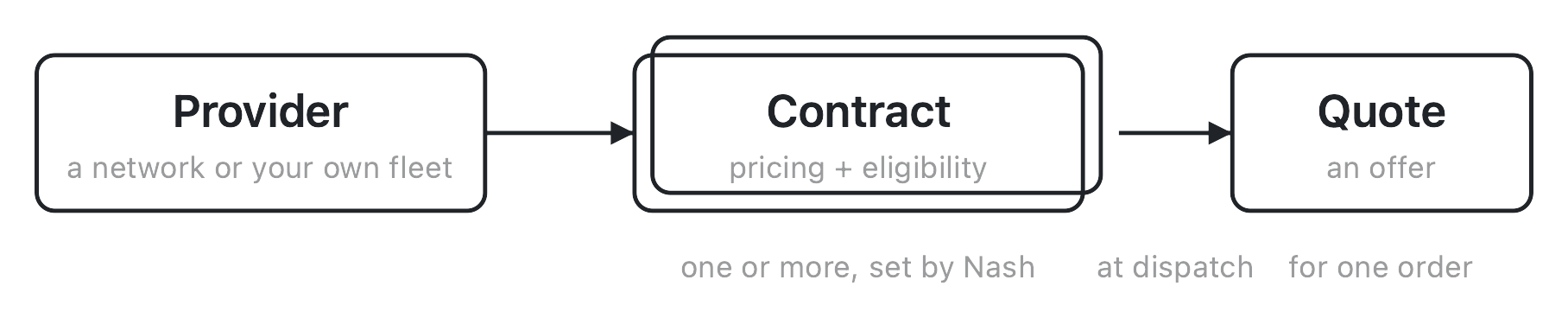
Put together, the chain reads: a provider carries your work under one or more contracts; each contract sets the terms; and at dispatch, every eligible contract turns into a quote you can act on. Which quote actually wins isn't part of this chain — that's a separate decision, covered later in this article and owned in full by how dispatch works.
Note
Providers, contracts, and quotes don't carry an operator-facing status the way a delivery does. A provider's "Status" column is a read-only uptime reading, not a state you move it through; a contract is either the current version or a superseded one; and a quote simply expires if it isn't acted on in time. There's no lifecycle to manage here the way there is for an order or a delivery — the object model above is the whole picture.
How eligibility and price are decided
Two things happen every time Nash checks a contract against an order: eligibility gets decided, and — if the contract is eligible — a price gets set.
Eligibility is a gate. A contract carries a set of criteria, and an order has to clear all of them before that contract is even considered:
- Geography — where the contract's provider operates, expressed as coverage over specific zones or regions. An order whose pickup or dropoff falls outside that coverage never reaches this contract at all.
- Vehicle type — whether the order's requested vehicle matches what the contract's provider can run.
- Package requirements — size, weight, or handling needs the order carries, checked against what the contract supports.
- Active period — the effective dates and, often, the specific weekday/time windows the contract is actually live for. Outside that window, the contract simply isn't in play.
- Lead time — how much advance notice the contract needs before the requested pickup or delivery time.
- Distance — limits on how far apart the pickup and dropoff can be.
- Order value — minimum and maximum thresholds the order's value has to fall within.
An order that clears every one of those criteria makes the contract eligible. Miss even one, and that contract sits out — it doesn't return a quote for this order at all, no matter how good its price would have been.
Price is the second half. For a contract that's eligible, Nash still has to work out what it would actually charge, and that happens one of two ways: some contract prices are calculated directly by Nash from the rate card and fees on the contract itself, while others come back from a real-time call out to the provider at the moment of dispatch. That real-time path has a consequence worth knowing honestly: if the call to the provider errors — a timeout, a bad response, anything that keeps a price from coming back — Nash treats that contract as not eligible for this dispatch, even if it would have passed every criterion above. A pricing failure and an eligibility failure look the same from where you're standing: the contract just isn't in the quote list.
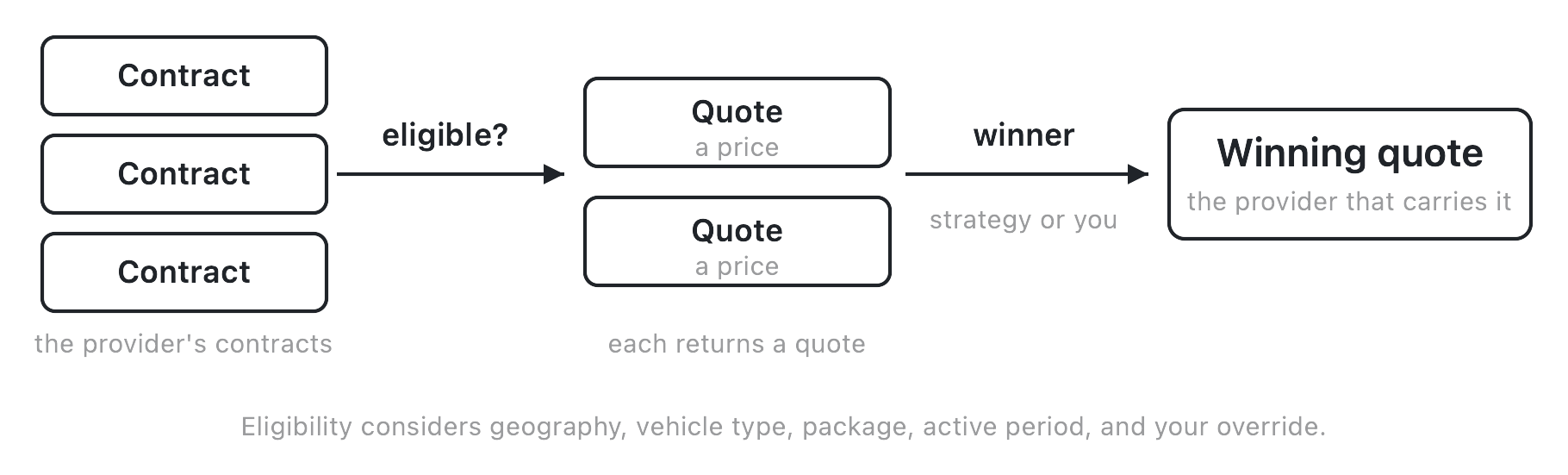
Geography, vehicle type, package requirements, active period, lead time, distance, and order value are all set on the contract itself, by Nash — you don't tune any of them directly. The one piece of eligibility you can set yourself is a provider eligibility override: a per-location restriction you layer on top of one of a provider's contracts, scoping where it applies for pickups, dropoffs, or both, down to a country, state, zip code, store location, or zone. An override can only narrow what a contract would otherwise cover — it's a restriction, not a way to expand a contract beyond what Nash configured. See Override provider contract eligibility for the field-level how-to.
Once the eligible set is known and each one has a price, deciding which quote actually wins the order is a separate step, owned by how dispatch works — this section is about what makes a contract eligible and priced in the first place, not about picking among the results.
What you can and can't change
It's worth stating the boundary plainly, because it's the same boundary running through every section above.
Providers are set up on your account by Nash. There's no self-serve "add a provider" button anywhere in the portal — the providers you see connected to your organization got there because Nash configured them. Availability of a given provider varies by organization; if you want to bring on a new one, that's a conversation to have with Nash, not a setting to flip yourself.
Contracts are priced and configured by Nash. The rate card, the fees, and every eligibility criterion described above — geography, vehicle type, package requirements, active period, lead time, distance, order value — are set up on the contract by Nash, not authored by you in the portal.
The one lever that's genuinely yours is the eligibility override. On top of a contract Nash has already priced and scoped, you can restrict where it applies for your organization — pickup, dropoff, or both, down to a country, state, zip code, store location, or zone. That's the full extent of what an operator edits on the provider/contract side: not what a contract charges, not most of what makes it eligible, just where one already-eligible contract is allowed to reach.
Important
If you're looking for a way to change what a provider charges, add a new provider yourself, or edit a contract's eligibility rules beyond location, that surface doesn't exist for operators today. The eligibility override is the one write available here — everything else about a provider or its contracts is Nash-configured.
A provider's own dashboard is outside Nash. Nash can't give you access to a provider's own website or dashboard. If you have your own account with a provider, ask them for access. Deliveries dispatched through Nash may not show up there. For reporting across all your providers in one place, use Nash analytics.
How a provider gets chosen at dispatch
The object model above explains what makes a contract eligible and priced. What happens next — picking a winner — is a dispatch decision, and it's covered in full by how dispatch works. In brief, so the two pieces connect: when you dispatch an order, Nash gathers quotes from every eligible contract across your connected providers, plus any of your own fleet that qualifies, and a winner is chosen one of two ways — automatically, following the order's dispatch strategy, or by hand, when you pick a quote yourself in the Assign Provider drawer. Either way, the provider behind the winning quote is who the job goes to.
This article stops there deliberately. The mechanics of strategy rules, manual quote-picking, and what happens when no eligible provider is left all live on how dispatch works and dispatch strategies — read those for the decision itself. What matters here is just that the winner is chosen from the set this article has been describing: the eligible, priced quotes that came out of your providers' contracts.
It's a useful check, though, when a dispatch doesn't go the way you expected. If a provider you were counting on never shows up as a quote, the cause is almost always upstream of the decision itself — one of its contracts wasn't eligible for that order, or the real-time price it needed never came back — rather than the dispatch strategy passing it over. The strategy can only choose among the quotes that actually arrived; it can't conjure one from a provider that never made it into the set.
What affects this
A handful of objects outside a provider's own record shape which contracts are eligible, what they charge, and which quote ultimately wins. None of these are fields you set on a provider or a contract directly — they're configured elsewhere and felt here.
| Input | Where it's set | Effect on providers, contracts, and quotes |
|---|---|---|
| Dispatch strategy | Automate ▸ Strategies — see dispatch strategies | Chooses the winning quote among the eligible, priced options when an order dispatches, whether automatically or by hand |
| A provider's contracts | Set up and priced by Nash | Gate which orders a provider is even eligible to see, and set what it charges when it is |
| The eligibility override | Providers ▸ drawer (operator) | Restricts one of a provider's contracts to specific pickup or dropoff locations for your organization — see Override provider contract eligibility |
| Zones & coverage | Configure ▸ Network ▸ Zones — see manage zones and define zone coverage | Sets where a provider operates, feeding the geography criterion every contract checks |
| Locations | Configure ▸ Network ▸ Locations — see manage locations | Supplies the store-location options an eligibility override or a contract's coverage can restrict to |
| Your own fleet | Configure ▸ Fleet — see manage your fleet | Your internal fleet appears as an Internal provider and quotes alongside external ones through the same eligibility and pricing chain |
| Order attributes | The order itself | Package requirements, vehicle type, and order value feed directly into which contracts an order clears |
None of these live on the Providers page itself, which is exactly why two providers that look identically configured can behave differently at dispatch, if the strategy, zone coverage, or fleet setup behind them differs. When a quote you expected doesn't show up, the explanation is usually one of these — a coverage gap, an override that's narrower than you thought, or an order attribute the contract doesn't accept — not a problem with the provider record itself.
One fact to carry out of all of this: Nash's part is gathering the eligible quotes, applying your rules, and handing the winning one off. The provider that wins — whether it's an external carrier or your own fleet — is who actually performs the delivery. Nash dispatches; it doesn't carry the work itself.