Accepting New Deliveries
Last updated: April 3, 2026
The New tab in the Driver App is where you can view all available deliveries and routes to you. Each card within the New tab is called a Job. This is also where Offered Jobs will be displayed. We'll cover both here.
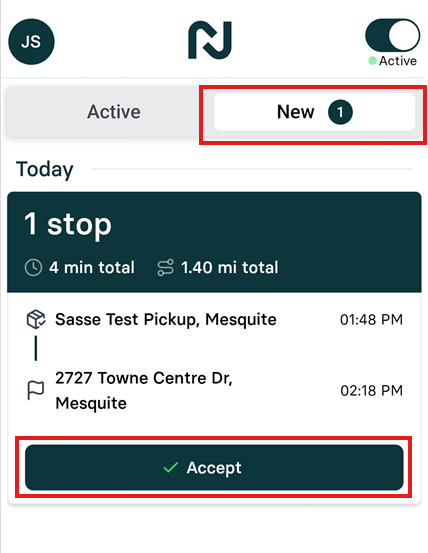
Accepting Available Jobs
Open the
NewtabView the list of New Jobs that you are eligible for
Click on an eligible job to view the details
Accept the job by clicking the
Acceptbutton on the New tab.
Important Considerations
Multiple drivers may receive the same delivery offer
First driver to accept keeps the delivery
Once the delivery is accepted, the delivery will be assigned to you and you are responsible for it.
Job Offers
A dispatcher can also offer a specific job just to you. When this happens, no other drivers can view or accept the job, but you have a limited amount of time to accept it.
When a new job is offered to you, you will receive a notification and an audible alert.
Open the
NewtabThe Job offer will be displayed at the top of the list, with a countdown timer and 2 buttons to respond: Accept or Decline
Accept the job before the countdown timer runs out by clicking the
Acceptbutton. If the countdown time runs out, the offer will be removed from your account and returned to the dispatcher.Decline the job by clicking the
Declinebutton. The Job offer will then be removed from your account and you will no longer be eligible for it.