Create Workflows
Last updated: October 1, 2025
Workflows in Nash enable dynamic management of delivery strategies using predefined rules. Workflows decisions ensure efficient handling of jobs tailored to specific requirements without manual intervention.
Overview
Workflows applies conditional logic to assign strategies based on job characteristics like location, package value, or item count.
Examples of Strategies:
Individual Order Strategy: Handles short-distance, low-cost deliveries.
High Value Strategy: Manages long-range, high-value, or white-glove deliveries.
Default Strategy: Combines all available fleets for general-purpose jobs.
Key Notes:
Workflows only apply to jobs without preassigned strategies.
The default strategy is used if no rules match.
Avoid conflicts when setting multiple rules.
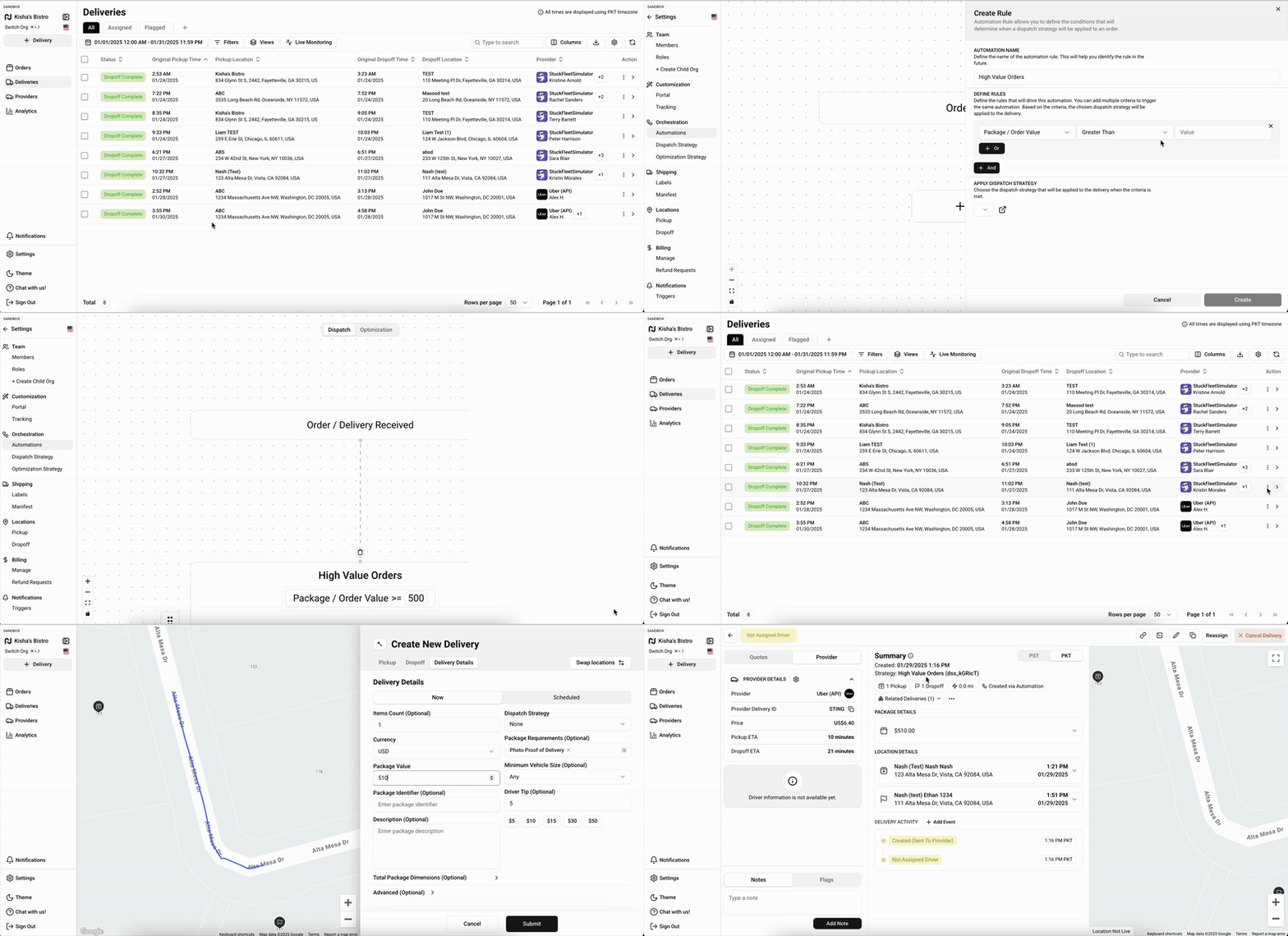
Example: High-Value Delivery Workflows
Name: High Value Delivery Strategy
Strategy: High Value Dispatch Strategy
Condition:
Property: Package Value
Operator: Greater Than
Value: 500
This rule applies the high-value strategy to jobs with package values over 500.
Steps to Create a Workflow
Access Settings
Log in to Nash.
Go to Settings > Workflows.
Create a Rule
Select the "+" button to add a new rule.
Name Your Rule
Use a clear, descriptive name.
Select a Strategy
Choose the dispatch strategy triggered by the rule.
Define Conditions
Select Add Criteria.
Set a property (e.g., Package Value), operator (e.g., Greater Than), and value (e.g., 500).
Add multiple conditions if needed:
Use "+Or" for alternative criteria.
Use "+And" for combined requirements.
Set Priority
Arrange rules in order of importance to resolve conflicts.
Save Your Rule
Select Save or Create.
Test Your Workflow
Create a test delivery matching the rule's criteria.
Verify the correct strategy is applied.
Best Practices
Start Simple: Begin with basic rules and add complexity gradually.
Regular Updates: Periodically review workflows to align with changing needs.
Clear Naming: Use descriptive rule names for easier management.
Thorough Testing: Ensure accuracy by testing after every update.
By leveraging Workflows effectively, you can streamline delivery operations, reduce manual input, and respond flexibly to varying market demands.