Adding Your Internal Fleet to Nash
Last updated: November 23, 2025
Integrating your in-house drivers into Nash helps streamline delivery management. Here's how to set up your internal fleet and add drivers:
Setting Up Your Internal Fleet
To integrate your internal fleet with Nash:
Notify your Nash Point of Contact to activate the fleet
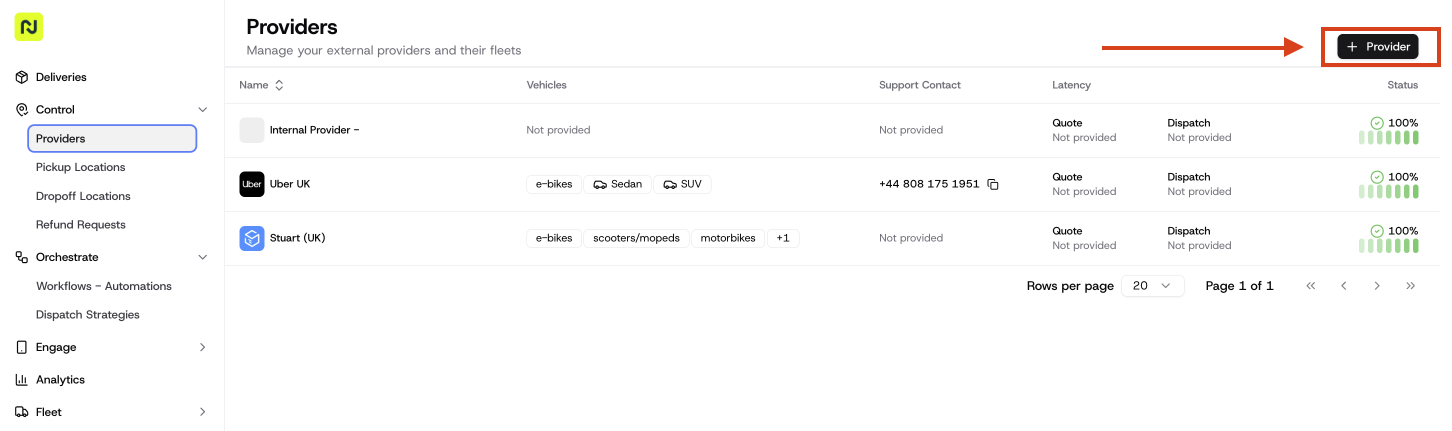
Navigate to the "Providers" section in your Nash dashboard.
Select "+Provider" to configure your in-house drivers.
Enter required details such as fleet name and other information.
Adding Drivers to Your Internal Fleet
After your fleet is set up, you can add drivers:
Go "Fleet" tab.
Click "+Driver" to start adding a driver.
Fill in driver details, including name and contact information.
How It Works
Once a delivery is assigned to an internal driver:
The driver receives a text message with job details.
They update the delivery status throughout the journey using the provided messages.
You can track delivery progress via the Nash portal.
Important Notes
Nash’s orchestration fee applies to all TMS-completed deliveries.
Drivers receive reminder texts 30 minutes before the scheduled pickup.
For multiple orders, drivers should complete the earliest drop-off first.
By integrating your internal fleet with Nash, you can efficiently manage in-house drivers and external providers, optimizing your delivery operations and logistics.