How widgets work
Last updated: October 12, 2026
A widget is a small Nash component you host on your own web page — a live map, an arrival-time chip, a delivery list, a delivery-details panel — that shows your customers the live state of a delivery without sending them anywhere else. This page is the model underneath the setup: the three things a widget needs before it will render, how your backend turns a long-lived secret into the short-lived session a browser can safely use, what each widget reads, and where a widget ends and Nash's own tracking page begins. For the settings and catalog, start with widgets; for the click-by-click, see embed a Nash widget on your site.
A widget displays a delivery — it never performs one. Nash dispatches the order; a provider or your own fleet carries it out. Every widget is a read-only view onto delivery state that already exists.
How it works
Think of a widget as a read-only window onto one or more deliveries' live state, opened inside a page you own. Nash serves what goes in the window — courier position, planned route, arrival time, current status — and keeps it current as the delivery moves; your page decides where it sits.
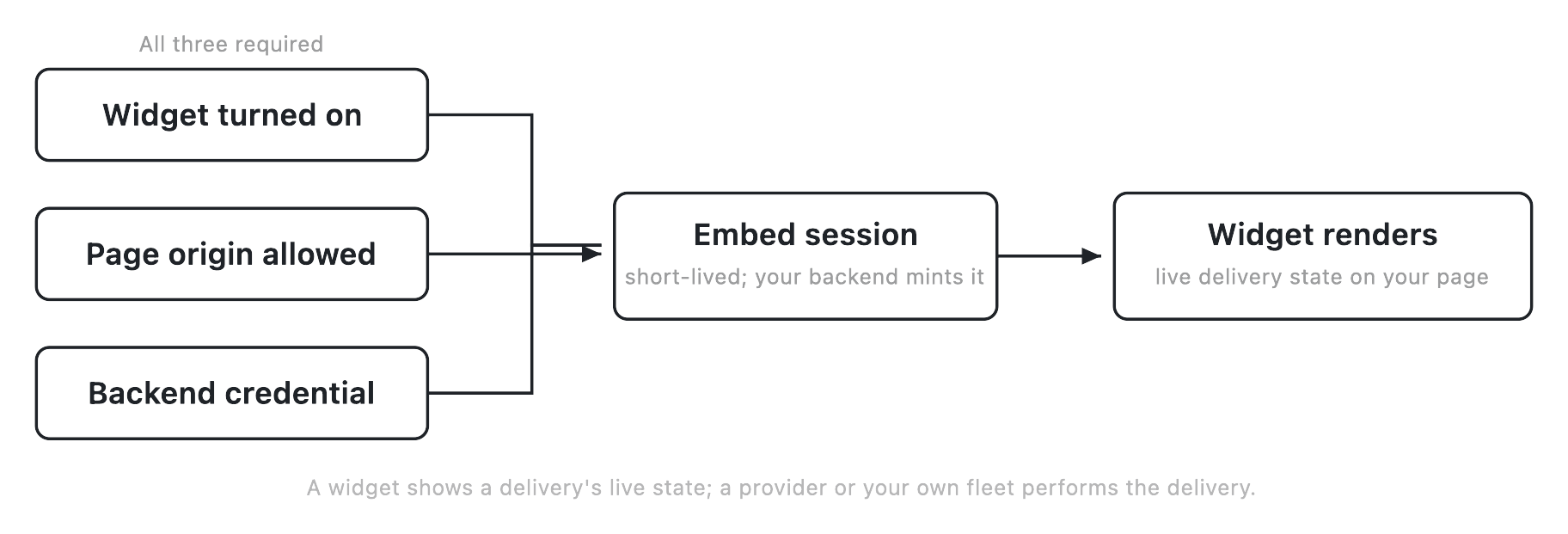
Because that's real delivery data on a public web page, Nash doesn't hand it to any page that asks. A widget serves only when three separate conditions are all true at once, and only after your backend has exchanged a long-lived secret for a short-lived session. Those two ideas — the three-piece gate and the two-secret hand-off — are the mechanism.
You reach all of this at Settings ▸ Connections ▸ Widgets. The page opens for people with organization-management permissions; if you don't see it, that's the gate — see manage users and roles. It stacks three sections — the catalog, allowed origins, and embed credentials — behind a progress strip that tracks setup.
The three pieces that gate each other
A widget serves on a page only when all three of these are true at once. Miss any one and nothing renders — there's no partial state where two out of three is enough, as the portal says in the catalog itself.
- The widget is turned on. You switch it on in the catalog. Off — the default — means Nash won't serve it anywhere. See turn widgets on and off.
- The page's exact origin is allowed. You add the exact web origin of every embedding page to the allowed-origins list; Nash serves only to a page whose origin is on it. See allow the sites that can embed your widgets.
- Your backend holds a credential. Your server holds a long-lived secret, issued from this page, that it exchanges for the session a browser needs. No credential, no session, no widget. See issue and manage embed credentials.
These are three independent switches wired in series — you set each separately, and the widget renders only where all three line up on the same page.
Important
The widget catalog and the allowed-origins list save together, behind one Save bar — nothing you change in either takes effect until you Save. Embed credentials are the exception: issuing, renaming, rotating, and revoking act immediately. So if a switch or origin change "isn't working," check that you Saved.
From a long-lived secret to a short-lived session
The credential is worth understanding on its own — it's what keeps live delivery data from leaking off a public page, and it works in two deliberate layers.
The credential is a long-lived secret that lives only on your server. It never goes into page code and never reaches a browser. Nash stores it one-way, so the full secret can't be read back after it's issued; you see the plaintext once, in the dialog that issues or rotates it. Its one job is to let your backend ask Nash for a session.
The embed session is what a browser actually uses. It's short-lived — at most 15 minutes — and carries only enough to render the specific deliveries in front of that customer. When a widget page loads, your backend presents its credential to Nash, Nash mints a fresh session, and your page hands that session to the widget. The long-lived secret stays on your server the whole time.
At mint time, Nash freezes into the session exactly which widget, which delivery ids, and the single web origin it may ever be used from. That frozen grant is the session's whole power. A few consequences follow:
- The disposable thing is the only thing exposed. A session scraped off a page expires within minutes and grants only that narrow view; the durable secret that could mint more sessions was never in the browser to take.
- The origin is checked at mint, not just at page load. Nash mints only for a page on an origin you've allowed, so a snippet copied onto some other site can't get a session at all. On every read after that, Nash re-checks that the page is the one the session was minted for — a session valid on your checkout page can't be replayed elsewhere.
- A refresh can only narrow. When a page renews a session, the new grant must be the same or smaller — same widget, the same or fewer deliveries, the same origin. A session's reach only shrinks.
You don't operate any of this by hand. Turning the credential into a session is one-time backend wiring your developers set up once; after that it runs on every page load. The Widgets page is where you issue, rotate, and revoke the credential it depends on.
Every setting on the page
The catalog — one on/off switch per widget
Each catalog row is a single On/Off toggle for one widget, Off by default. Turning it on is necessary but not sufficient — the origin and the credential still have to be in place. Turning it off stops Nash serving new sessions for it. The five rows are Nash Agent, Live Map, ETA Chip, Delivery List, and Delivery Details; each also shows read-only context (what it replaces, where it tends to live, why it earns its place), but the toggle is the only setting you change.
A separate line, the roadmap footer, lists names of widgets being explored. None are built and none have dates — treat them as a wishlist, not features you can turn on.
Allowed origins — the exact-origin allowlist
An origin is the scheme://host of a page, plus a port if non-default —
https://shop.example.com, or https://shop.example.com:8443. You can list up
to 50 per organization, and the match is exact: https://staging.example.com
is a different origin from https://www.example.com, from http://..., and from
the same host on a different port. Nash tidies a few harmless things — a lone
trailing slash is dropped, the host is lowercased — but rejects anything
ambiguous: a path, a wildcard (add each subdomain on its own), a missing scheme
(http:// and https:// are different origins), and duplicates.
Adding an origin and saving lets pages on it mint sessions. Removing a saved origin asks you to confirm, because it isn't fully instant: new mints stop right away, but sessions already minted from it keep working until they expire (15 min at most).
Tip
Add every origin that will embed a widget, staging included. The most common "works in production, fails in staging" report is simply a staging origin that was never added — because the match is exact, production being on the list does nothing for a different host, scheme, or port. Add non-default ports and both
wwwand bare hosts explicitly too, if you use them.
Embed credentials — the long-lived backend secrets
Each credential row shows a name (a cosmetic label you choose), a masked display of its last four characters, its status, when it was last used, and its lifecycle dates. You can hold up to 5 usable credentials per organization; four actions manage them, all immediate:
- Issue creates a new credential and reveals its plaintext secret once. Name it after where it will live; you rotate and revoke by name later.
- Rename changes the label only — it does nothing to the secret.
- Rotate issues a replacement and retires the outgoing one. The recommended path keeps the old secret working for a default 60-minute overlap while you deploy the new one; "retire immediately" cuts it off the moment you rotate — use that only if you think the secret leaked.
- Revoke kills a credential immediately, with no wind-down and no undo, and cascade-revokes every live session it minted.
Note
The plaintext secret is shown exactly once, in the issue or rotate dialog, and Nash genuinely can't re-show it. Copy it straight into your backend's secret manager before you close the dialog. If you lose it, you don't recover it — you rotate to get a fresh one, or issue a new credential and retire the old.
What each widget reads
A session can only ever reach its own widget's data, and each widget reads a different, narrow profile of the same delivery — which is why the widget is frozen into the session at mint.
| Widget | What it shows | Copy-paste snippet in the portal |
|---|---|---|
| Live Map | Courier position, the planned route line, and the requested delivery's own pickup and drop-off | Yes |
| ETA Chip | A compact arrival time for one delivery, updated as the estimate moves | Yes |
| Delivery List | Summary rows — status, ETA, arrival, origin, package count | Yes |
| Delivery Details | A focused summary — courier, arrival, stop and package details | Yes |
| Nash Agent | An assistant your customers talk to about their orders | Embedded per agent, not from this catalog |
Nash Agent is never embedded from this catalog: its embeds are set up per agent, on that agent's own Embed tab, and existing agent embeds keep working regardless of this switch — see what Nash Agent is.
A snippet is a short piece of code you paste into your page. It points at a route on your own backend, which exchanges the credential for a session. Each widget's snippet points at its own route. Copy snippets with Embed snippet rather than typing them.
A single session caps at 50 delivery ids per widget; show more and you split them across sessions or narrow the set. On a shared route, Live Map returns only the requested delivery's own pickup and drop-off — never the sibling stops — so a customer sees their delivery, not everyone else's.
States and transitions
A widget moves through these states:
| State | What it means | Typical next step |
|---|---|---|
| Off | The switch is off (the default) | Turn it on to begin embedding |
| On, not fully wired | On, but no allowed origin and/or no credential yet | Add an origin and issue a credential |
| On and serving | On, an origin is allowed, and a credential is held | Embed the snippet; pages render live state |
| Paused by Nash | Nash has temporarily paused this widget; a pause wins over your own switch | Your On/Off is preserved — contact Nash, and it resumes to whatever you had it set to when the pause is lifted |
An embed credential moves through these states:
| State | What it means | Typical next step |
|---|---|---|
| Active | Usable; can mint sessions | Normal operation |
| Retiring · until | Being rotated out; still works during the overlap window | Move your backend to the new secret before that time |
| Expired | Past its expiry; can't mint | Issue or rotate a replacement |
| Revoked | Permanently killed; its sessions were cascade-revoked | Issue a new credential |
An embed session has this lifecycle:
| Step | What happens |
|---|---|
| Mint | Your backend exchanges the credential for a session; the widget, deliveries, and origin are frozen in |
| Live (≤15 min) | The browser reads delivery state; the origin is re-checked on every read |
| Refresh | A new session is issued whose grant is the same or smaller — never wider |
| Expire | The session ends at its time limit; capacity frees on its own |
| Cascade-revoked | Its credential was revoked or hard-rotated, ending the session at once |
Edge cases and failure modes
- Nothing renders at all. Almost always one of the three gates is missing. Is the widget On and Saved? Is the page's exact origin (scheme, host, port) on the list and Saved? Does your backend hold an Active credential?
- A "Paused by Nash" badge. An operational pause, not something you changed; your On/Off is preserved underneath and it resumes when Nash lifts it. You can't clear it yourself — see contact Nash support.
- Issuing a credential is refused. You're at the cap of 5 usable credentials. Revoke an unused one, or rotate in place instead of issuing net-new. An in-progress rotation counts against the cap during its overlap window.
- A credential may have leaked. Rotate with the immediate-retire option, or revoke — both kill the credential and cascade-revoke every live session it minted, so a captured browser secret dies with it (any in-flight page loses its session at once).
- Embeds stop after a rotation. Your backend is still presenting the retired secret past its overlap window — the row reads "Retiring · until {time}" and then "Expired." Point the backend at the new secret before the overlap ends; you can shorten an existing overlap, never lengthen it.
- Sessions are intermittently denied under heavy use. There's a ceiling of 500 live sessions per organization at once. Only live sessions count and each lasts 15 minutes at most, so the pool drains on its own — reduce redundant embeds and open tabs to recover.
- "Too many deliveries" on a map or list. A single session caps at 50 delivery ids per widget — split across sessions or narrow the set.
- Live Map loads, but another widget doesn't. Each widget needs its own route on your backend. Ask your developer to check the route that widget's snippet points at.
- A shared-route Live Map shows only one stop pair. By design — it returns only the requested delivery's own pickup and drop-off, never its neighbors.
A widget is not the tracking page
It's easy to blur a widget together with Nash's hosted tracking page, since both show a customer where a delivery is. They're different surfaces, set up in different places.
The Live Map widget is your component, on your page, under your domain — you turn it on, allow your origins, hold the credential, and place it in your own layout, gated by the credential-and-session chain above. Nash's customer tracking page is a page Nash hosts and serves: the link a customer opens from a tracking notification, with no credential involved. You don't embed it — you point customers to it and brand it from the tracking side of the portal. See send customers a tracking link and brand your tracking page.
The two share only one thing — the clock on how long delivery data is kept. Everything else, including branding and notifications, belongs to tracking.
What affects this
A few things outside your three switches change whether and how a widget serves. Each has its own home; this is what it does here.
| Object | Where it's set | What it does here |
|---|---|---|
| Organization-management permission | Settings ▸ Organization — see manage users and roles | Controls who can open the Widgets page and edit the catalog, origins, and credentials at all. |
| Allowed origins | Settings ▸ Connections ▸ Widgets — see allow embed origins | Decides which pages can mint a session; a page on an unlisted origin is refused. |
| Embed credentials | Settings ▸ Connections ▸ Widgets — see manage embed credentials | The long-lived secret your backend exchanges for each short-lived session; revoking one drops the sessions it minted. |
| Deliveries | Operate ▸ Deliveries — see how deliveries work | The live state a widget reads; a session can only reach delivery ids that belong to your organization. |
| Tracking page & notifications | Settings — see how tracking and notifications work | Nash's own hosted tracking surface — a separate thing from a widget, branded and sent from tracking, not from Widgets. |
Note
Whether a specific widget is available to your organization can depend on your setup, and Nash may temporarily pause one. Neither is a switch you flip — if a widget you expect isn't there, reach out to Nash rather than assuming a misconfiguration.
The bottom line: a widget shows delivery state — it doesn't perform the delivery. Nash dispatches the order, a provider or your own fleet carries it out, and the widget is the live view of that on your own page. When a widget isn't rendering, it's one of the three pieces — off, origin not allowed, or no working credential — or Nash has paused it.