How delivery incidents work
Last updated: October 12, 2026
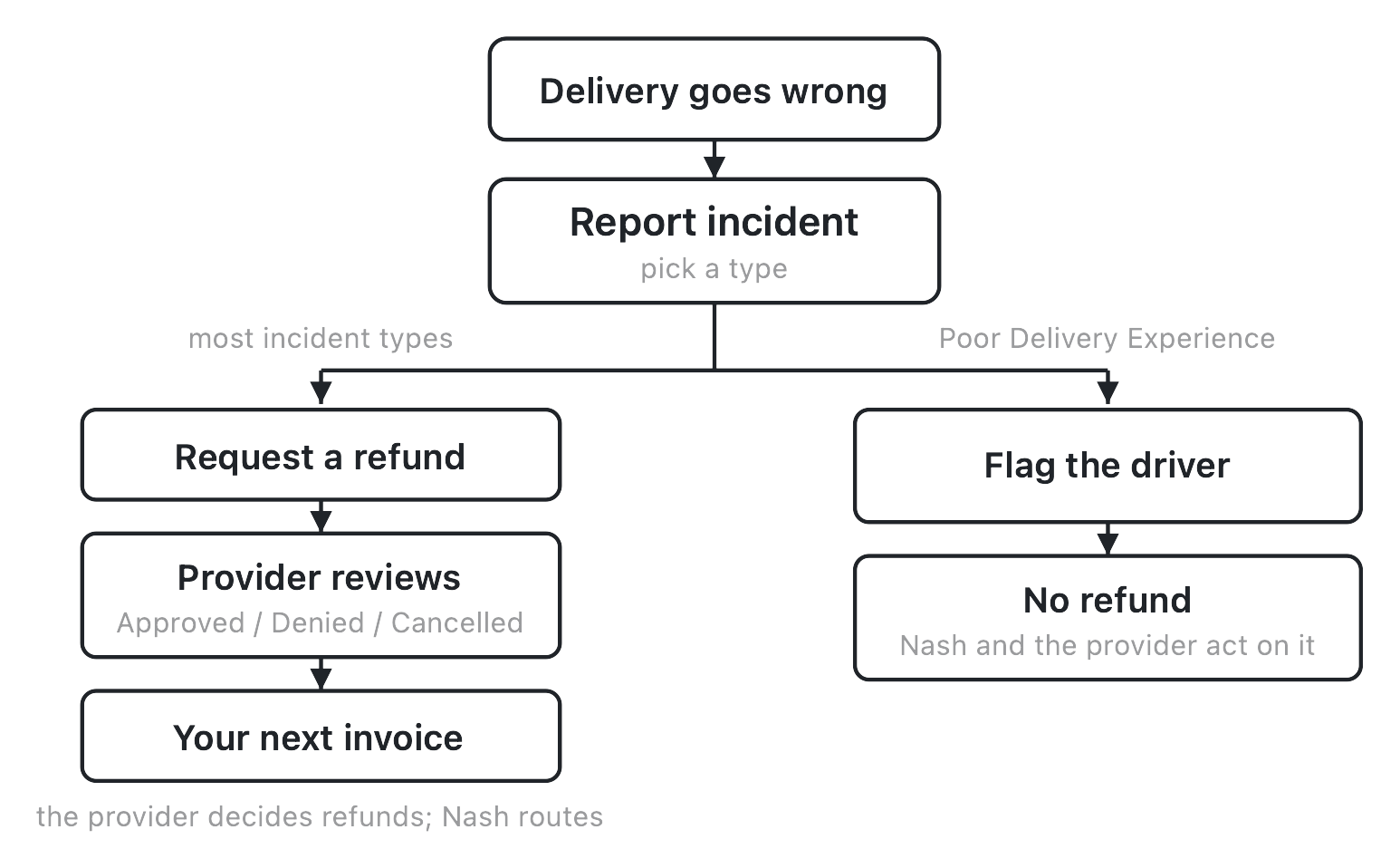
A delivery incident report is what you file when a delivery goes wrong. It's one object with two very different endings: for most incident types, filing one is how you request a refund; for one type, Poor Delivery Experience, filing one raises a concern about the driver instead, and by default asks for no money back at all. Everything below hangs off that one fork — what happens when you file, which type sends you down which path, who actually decides a refund, and what's still yours to do once the report is in.
How it works
You file a delivery incident report from the delivery itself — open it, select Report Incident, and pick a type from the seven available (the full list, with what each one means, is in the delivery incident reference). That one choice determines everything that follows, because the type you pick sets whether you're on the refund path or the flag path.
On the refund path — which covers six of the seven types — filing the report walks you through a short wizard: add details about what happened, attach evidence, and set the amounts you're asking to get back. Submitting sends a refund request to the delivery provider that carried the delivery. From there it's out of your hands in a specific way worth being precise about: the provider decides whether to approve or deny it. Nash's role is to route the request to the provider and track its status for you — as a rule, Nash doesn't approve, deny, or fund a refund itself (there's one fallback exception, covered below, where Nash approves in the provider's place). You watch the outcome on the Refund Requests page, and an approved refund is reflected on your next invoice, not as an instant credit.
On the flag path — Poor Delivery Experience, the one exception — the report doesn't ask for a refund by default at all. It's how you tell Nash and the provider that something about the driver or the experience wasn't acceptable, up to and including asking that the driver be blocked from future work on your account. There's more to that path in its own section below.
A failed or otherwise unsuccessful delivery is a common reason to end up here — see handle failed deliveries for what a failure looks like before you get to the incident report. And because a report is filed against a specific delivery attempt, it helps to have the object model in mind; see how deliveries work.
The incident types and their outcomes
Every delivery incident report starts with picking one of seven types, and each one lands on one of exactly two outcomes:
| Type | Outcome |
|---|---|
| Arrived Late | Refund request |
| Delivered Early | Refund request |
| Delivered to Wrong Address | Refund request |
| Missing or Incorrect Items | Refund request |
| Never Delivered | Refund request |
| Poor Delivery Experience | No-refund flag / driver-block request |
| Other | Refund request |
Six types default to asking for a refund, with the specific wizard steps (details, evidence, amounts) described above. Missing or Incorrect Items adds one extra question — whether the item was damaged — since that changes what evidence is expected. Never Delivered and Delivered to Wrong Address surface the delivery's proof-of-delivery photos as part of the flow, so you can check what was actually captured before you file; see review proof-of-delivery photos for what those photos show and how to read them.
Poor Delivery Experience is the one type that breaks the pattern on purpose. It's covered on its own further down, and in full in report a poor delivery experience.
For the field-by-field walkthrough of filing a refund request specifically — the wizard screens, what's required, what's optional — see request a refund.
The refund status lifecycle
Once a refund request is filed, it moves through a small set of plain- language states, and the page you watch them on groups them into three tabs:
- Under review — the request has been filed and sent to the provider; it's waiting on their decision. This is where every request starts, and it shows up under the Pending tab.
- Approved — the provider decided to grant the refund, with an amount and a response recorded. This shows under the Refunded tab. (You may also see an approval attributed to Nash rather than the provider on that same tab — a fallback path that still lands in the same place from where you're standing: an approved refund, reflected on your next invoice.)
- Denied — the provider decided not to grant it. This shows under the Rejected tab.
- Cancelled — the request was withdrawn before a decision came back and won't be reviewed further. This also shows under the Rejected tab.
Approved, Denied, and Cancelled are all endpoints — once a request lands on one of them, it doesn't move again. There's no "reopen" step for a request that's already been decided.
The throughline across every state is the same fact: the provider decides, Nash routes. Nash's part is getting the request in front of the right provider, holding it while it's under review, and surfacing whatever the provider decides — not making the call itself. A denied refund isn't a Nash override you can trigger from the portal; it's a conversation to have through the provider relationship the request already went to.
Note
"Refund Requests" is the name of the tracking page regardless of which incident type led there — a Poor Delivery Experience report that isn't asking for a refund at all still shows up on that same page, just without refund amounts attached to it.
What the provider weighs
Because the provider is the one deciding, what actually gets a refund approved comes down to their policy and the specifics of the delivery, not a fixed rule Nash applies uniformly:
- The Arrived-Late grace-period gate. This one is specific to the Arrived Late type, not a blanket rule about lateness or earliness in general: if you report Arrived Late on a delivery that actually arrived within the provider's acceptable window, the request shows a "Delivered on time" message and doesn't go forward. It's a real, enforced check — reporting Arrived Late on a delivery that genuinely cleared the provider's window won't produce a refund, no matter how the report is filed. See refund eligibility for the full picture of when a request is likely to be granted.
- Evidence. A receipt is required any time you're asking for a refund — the wizard won't let you submit without one — and a damage photo is expected when the incident involves something damaged. Stronger evidence gives the provider more to decide on; it doesn't guarantee an outcome, but a bare note is a harder case than a note backed by a receipt and, where relevant, a photo.
- Requested versus granted amounts. What you ask for and what you get back aren't the same thing by default. You set a requested amount across Package Value, Delivery Fee, and Tip Amount when you file; the provider records its own granted amount, and the two can differ. Asking for more than the delivery's original value isn't blocked outright — you'll just see a warning — but it's the provider's call whether to grant it as asked, grant something smaller, or deny it.
None of this is Nash second-guessing the provider. It's what tends to move the needle on the provider's side, based on what the request carries when it reaches them.
What you can and can't do
Filing and tracking are yours; changing a decision once it's made isn't.
What you can do:
- File a delivery incident report against any delivery once it's past the point of just being created and waiting for a provider.
- Track every report you've filed — refund or not — on the Refund Requests page, including its current status, the amounts involved, and the provider's response once there is one.
- File a new report if a different problem comes up.
What you can't do:
- Edit a filed report. Once it's submitted, the details, evidence, and amounts you set are locked in from your side. There's no "revise and resubmit" — the record is what it is once it's filed.
- Cancel or withdraw a filed report. There's no cancel control in the portal once a request is submitted — it runs its course to Approved, Denied, or Cancelled without any action from your side.
- Approve, deny, or otherwise decide the outcome yourself. That's the provider's call.
- Get an instant refund. Even an approved request pays out as a reflection on your next invoice, not an on-the-spot credit. See billing overview and view invoices and billing history.
In short: a filed report is view-only from that point forward. That's true whether it's a refund request working its way through the provider's decision, or a Poor Delivery Experience flag Nash and the provider are acting on off-platform.
The Poor Delivery Experience path
Poor Delivery Experience is worth its own treatment because it doesn't behave like the other six types. Where the rest of this article has been about requesting and tracking money back, this one is about something different: raising a concern about the driver, up to and including asking that the driver not be sent to you again.
Filing this type of report defaults the refund toggle off — you can still turn a refund on if you genuinely want one, but the type exists for the case where money isn't the point. What you're really doing is telling Nash and the provider the delivery experience itself was the problem: the driver's conduct or handling, not a late arrival or a missing item. In the portal, the framing is simple — "there were issues with the delivery experience" — and the details you add carry the specifics.
Here's the honest limit of what filing this report does: there is no automated "block this driver" control in the portal. Filing the report doesn't itself keep a driver off your future deliveries or trigger an automatic consequence. What it does is put the request in front of Nash and the provider, who act on it — reviewing what happened and deciding, on their side, whether the driver in question should be kept away from your deliveries going forward. That means:
- No guaranteed outcome. Filing the report starts a conversation, not a mechanical block. What happens next depends on what Nash and the provider find and decide.
- No refund by default. Unlike the other six types, this one doesn't assume you're owed money back. If you also want a refund for the same delivery, you can ask for one as part of the same report, but it isn't automatic here the way it is elsewhere.
Treat this type as the right one to reach for whenever the problem is about the person delivering rather than the package or the timing — even when you also want a refund, filing under Poor Delivery Experience is how you make sure the driver-conduct concern actually gets raised rather than buried inside a Missing Items or Arrived Late note. The full walkthrough, including what to include in your details for the strongest case, is in report a poor delivery experience.
What affects this
None of the following live on the incident report itself, but each one shapes whether you can file at all, what a refund is actually worth, and where an approved one shows up.
| Input | Where it's set | Effect on a delivery incident |
|---|---|---|
| The provider and its contract | Configure ▸ Network — see manage providers | Whether a refund can be requested at all on a given delivery, and which provider decides the outcome — a delivery running on a provider that doesn't support refund requests won't offer the option |
| Provider policy and the delivery window | Set by the provider, applied at decision time | Whether a refund is actually granted, including the Arrived-Late grace-period gate described above — see refund eligibility |
| The delivery's state | The delivery itself | Report Incident only becomes available once a delivery is past being freshly created and waiting for a provider — see how deliveries work and, for how a provider ends up assigned in the first place, how dispatch works |
| Org billing and invoicing | Settings ▸ Billing (downstream finance) | Where an approved refund actually lands — reflected on your next invoice, not as an instant credit — see billing overview and view invoices and billing history |
Two deliveries that look identical on the surface can behave differently here if the provider behind one doesn't support refund requests, or its grace-period and evidence policy differs — none of that is visible on the delivery record until you try to file. The fact worth carrying out of this article: filing a delivery incident report is always a request. The provider decides a refund; Nash and the provider act on a Poor Delivery Experience flag. Nash routes and tracks either way — it doesn't make the call itself.